

From Homemade Media Hub to Streaming Powerhouse: Revisiting Plex 20 Years Later
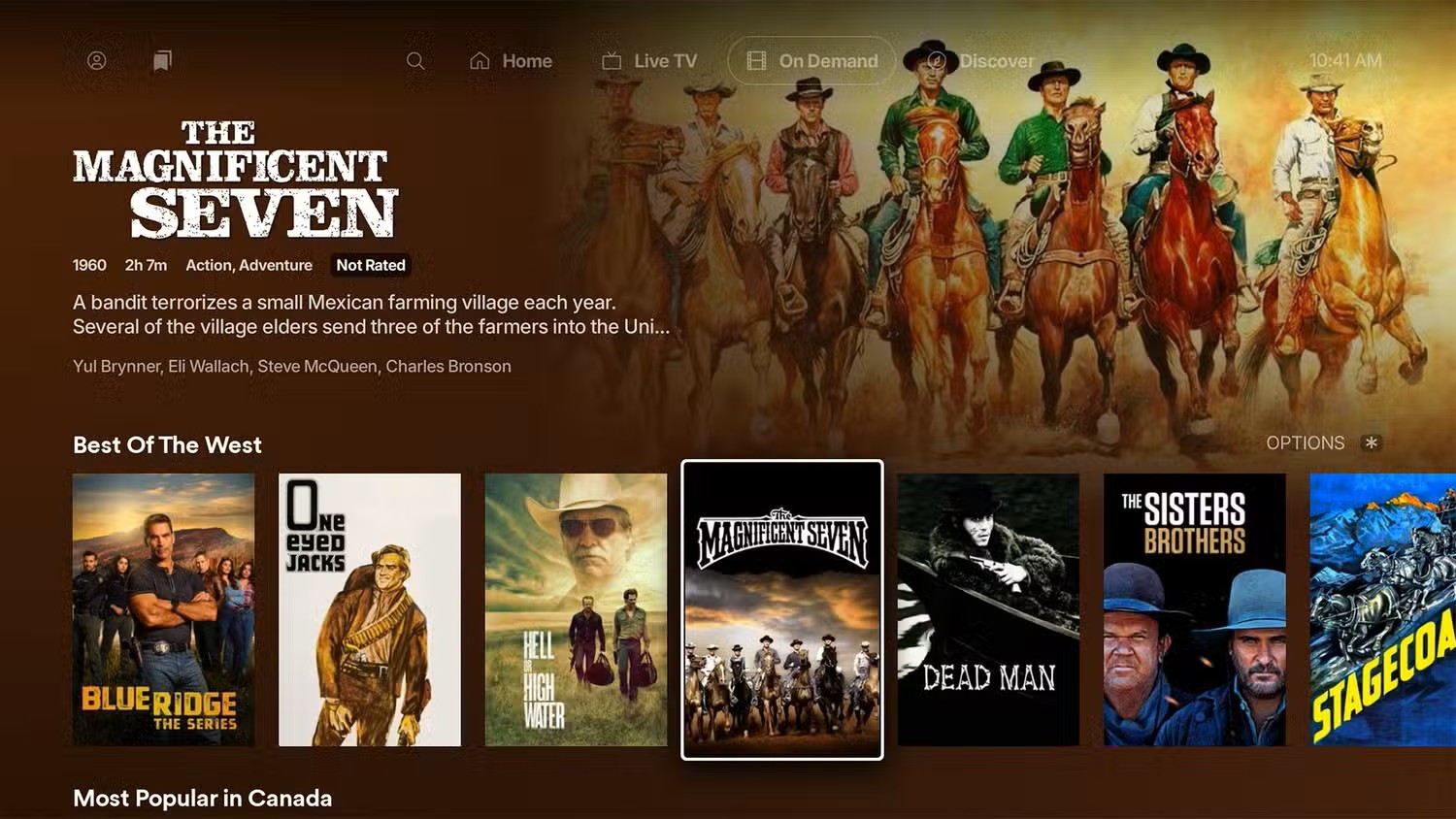
Twenty years ago, when I first built my personal media server, Plex was the heart and soul of the setup. Back then, streaming local hard drives to a living room TV required a mix of patience and custom scripts, but Plex made it feel like absolute magic.
Fast forward two decades, and Plex is not only still alive—it’s thriving and expanding rapidly. Today, it has evolved into a full-fledged streaming ecosystem, bridging the gap between personal self-hosted media and free, ad-supported streaming TV (FAST).
If you haven't looked at the platform in a while, here is how the ecosystem stacks up today, along with some of the latest additions to its growing library.
The Expansion: Free Live TV & On-Demand
While Plex built its reputation as a personal media management tool, its free streaming ecosystem has grown exponentially. It now boasts over 50,000 on-demand titles and more than 600 free live TV channels, placing it alongside major free platforms like Tubi, Pluto TV, and The Roku Channel.
Plex recently expanded its live TV lineup again with seven new channels:
- Monsters Are Real: Documentaries and investigative series covering unexplained phenomena and legendary cryptids.
- Western Bound: Classic Western movies and vintage TV series.
- Racing America: US motorsports coverage, event highlights, and race action.
- Metal Rocks: Dedicated heavy metal music videos, live sets, and band coverage.
- Soul Flix: Independent films, urban dramas, and soulful stories.
- Cosmic Frontiers: Astronomy documentaries, space exploration, and science programming.
- Complex TV: Pop culture, streetwear trends, music, and digital lifestyle content.
These channels are built directly into the main Plex app across supported devices—including smart TVs (Samsung, LG, Sony, Hisense, Vizio), streaming sticks (Apple TV, Roku, Fire TV, Google TV), and mobile devices (iOS/Android)—no server setup required.
The Good
The Core Personal Engine Remains Unmatched: Automated metadata retrieval, movie poster matching, local file indexing, and smooth transcoding mean your self-hosted video and music collections remain accessible anywhere.
600+ Free FAST Channels: The addition of niche channels means there’s always background TV playing, whether you're into motorsports, sci-fi, classic westerns, or news.
Universal Search & Discover: Plex acts as a unified hub for all streaming providers. You can search across external platforms like Netflix, Prime Video, or Max, add titles to a centralized watchlist, and launch directly to the respective app.
Cross-Device Availability: Smooth, modernized interfaces across virtually every smart TV, mobile platform, and browser ensure seamless remote playback.
The Bad
Ad Load on Free FAST Channels: The free tier relies on unskippable commercial breaks. While necessary to support free content, the frequency can occasionally interrupt movie pacing.
Default UI Clutter: For purists who only want to access their local hard drives, the home screen defaults to promoting ad-supported movies, discover tabs, and commercial hubs (though these can be turned off in navigation settings).
Paywalled Features (Plex Pass): High-end utility functions—such as hardware-accelerated 4K transcoding, mobile offline sync, and advanced user permissions—remain behind the Plex Pass subscription model.
The Ugly
Hardware Overhead for 4K Transcoding: Running automated metadata libraries, multi-user remote access, and real-time 4K hardware transcoding still demands capable server hardware and solid network bandwidth.
The Death of Plugins: Legacy HTPC users will remember the vibrant era of custom third-party channel plugins and scripts. Plex sunsetted plugin support in favor of integrated ad-supported streaming, leaving less room for old-school tinkering.
Final Verdict
Twenty years after setting up my first home media server, Plex remains an essential part of the home theater stack. It successfully balances two distinct worlds: self-hosted media libraries for data hoarders and a free, turn-key cord-cutting TV platform for casual viewing. A quick pass through the settings menu lets you strip away the extra commercial fluff if you want a lean server, but as a complete media solution, it continues to improve.
Watch your Plex content on your Android device
Today I am using an OLED TV from Phillips, I just love the true colours from an OLED screen, all other panels are just trying to look a loike an OLED, in my openion.
What You Can Watch on Android
- Your Personal Media Server: Stream your self-hosted movies, TV shows, home videos, and photos directly to your Android device over Wi-Fi or cellular networks.
- 600+ Free Live TV (FAST) Channels: Access Plex’s built-in live ad-supported television channels (news, motorsports, classic shows, westerns, movies) without needing a server.
- 50,000+ Free On-Demand Movies & Shows: Browse Plex’s free ad-supported streaming catalog directly inside the Android app.
- Universal Discover & Watchlist: Search across all major streaming services (Netflix, Prime Video, Disney+, etc.) from the Android app and maintain a single watchlist.
Android App Unlocking & Plex Pass
You can install the Plex app on different Android devices as your phone, your TV, your tablet, your TV stick and many more devices.
- Key Features on Android
Chromecast Casting: Cast video playback from your Android phone directly to any Chromecast-enabled TV or display. - Offline Downloads: With a Plex Pass subscription, you can download movies and episodes directly to internal storage or an SD card for offline viewing during flights or travel.
- Picture-in-Picture (PiP): Keep watching your video in a floating window on Android smartphones while browsing other apps.
